 TraLand.com

Karaoke
Bring your own songs. Lose the singer, keep the band.
Point Karaoke at an ordinary song and it separates the singer from the band, then plays the backing on its own — video and all. It runs on your Mac, takes about half a minute, and is cached from then on. It still plays the files you already own, and writes synced lyrics when a song has none.
✨ AI vocal removal — turn a song you own into a karaoke track

Lose the singer, keep the band
Point Karaoke at an ordinary song and it separates the voice from everything else, then plays the backing track in place of the original — video included. It runs on your Mac's GPU, takes about half a minute, and is cached afterwards, so the next play is instant. Nothing is uploaded. Prefer to hear the voice on its own? Vocals Only does the reverse, which is the quickest way to learn a melody.
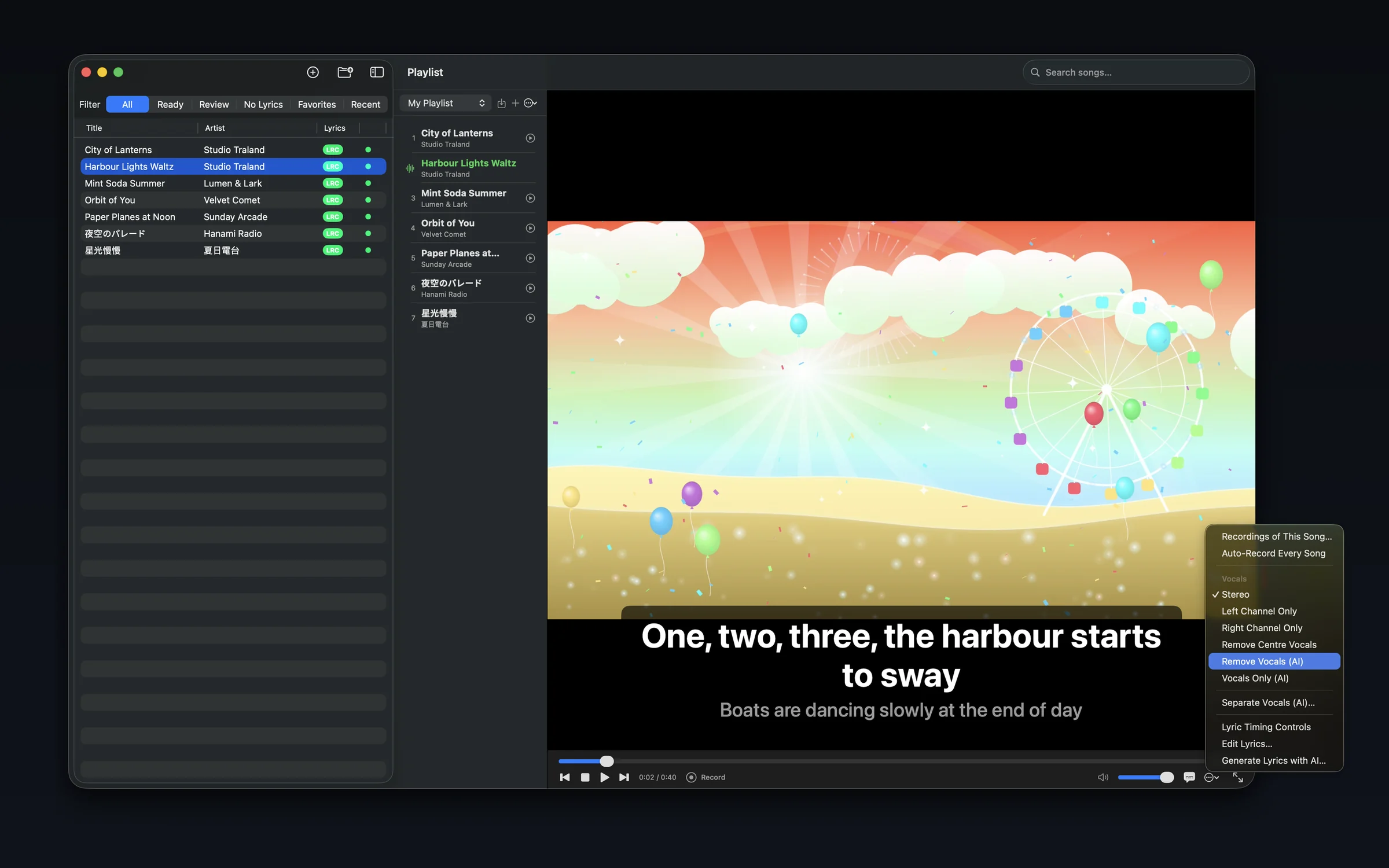
Remove Vocals (AI) On-device
Separates the voice from the band. On a live recording it suppressed the vocal by about 21 dB against 17 dB for the older centre-channel method, and with roughly half the damage to the backing.
Left / Stereo / Right Instant · exact
Traditional karaoke discs often put the guide vocal on one channel and the backing on the other. Switching channel removes it exactly, with no processing and no wait.
Remove Centre Vocals Instant
The older method, still here when you don't want to wait. It attenuates whatever sits in the middle of the stereo image, which takes some drums and bass with it.
Before you start: AI separation needs a Mac with Apple silicon — on Intel Macs, channel select and centre-vocal removal are available instead. The AI features download their models the first time you use them, about 160 MB for separation and 630 MB for lyrics, and are offline after that. Separation is at its best on studio recordings; live recordings, where the voice is soaked in hall reverb, are the hard case and leave more of the singer behind.
No lyric file? The app writes one — in sync
Point Karaoke at a song with no lyrics and it transcribes them with timestamps, so what you get back isn't a wall of text — it's a synced track ready to sing. You pick the engine, preview every line, and save when it looks right.
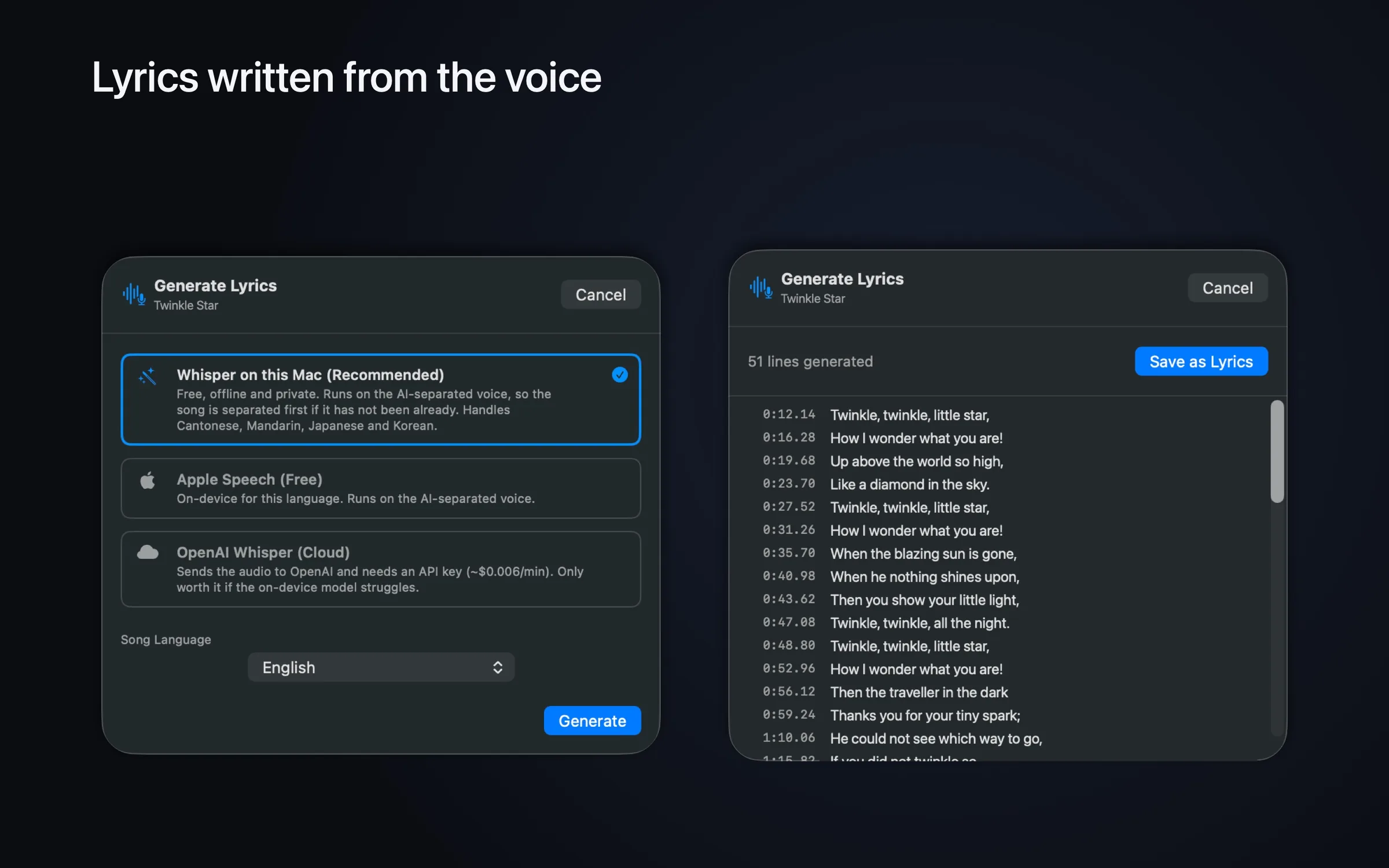
Whisper on this Mac Recommended
Free, offline and private. It transcribes the separated voice rather than the full mix, which is why Cantonese, Mandarin, Japanese and Korean work now when they could not before.
Apple Speech Free · on-device
On-device where macOS has a model for the language — reliably English and Japanese. For Cantonese, Mandarin and Korean macOS has none, and falls back to its servers, which stop after about a minute and cannot finish a song.
OpenAI Whisper Cloud · optional
A last resort, off by default. Needs your own API key (~$0.006/min) and sends that song's audio to OpenAI. Only worth it if the on-device model struggles.
Languages: Cantonese, Mandarin, Japanese, Korean, English, German, French, Spanish, Malay, Thai and Vietnamese. Chinese can be written in traditional or simplified characters.
Your whole library, ready to sing
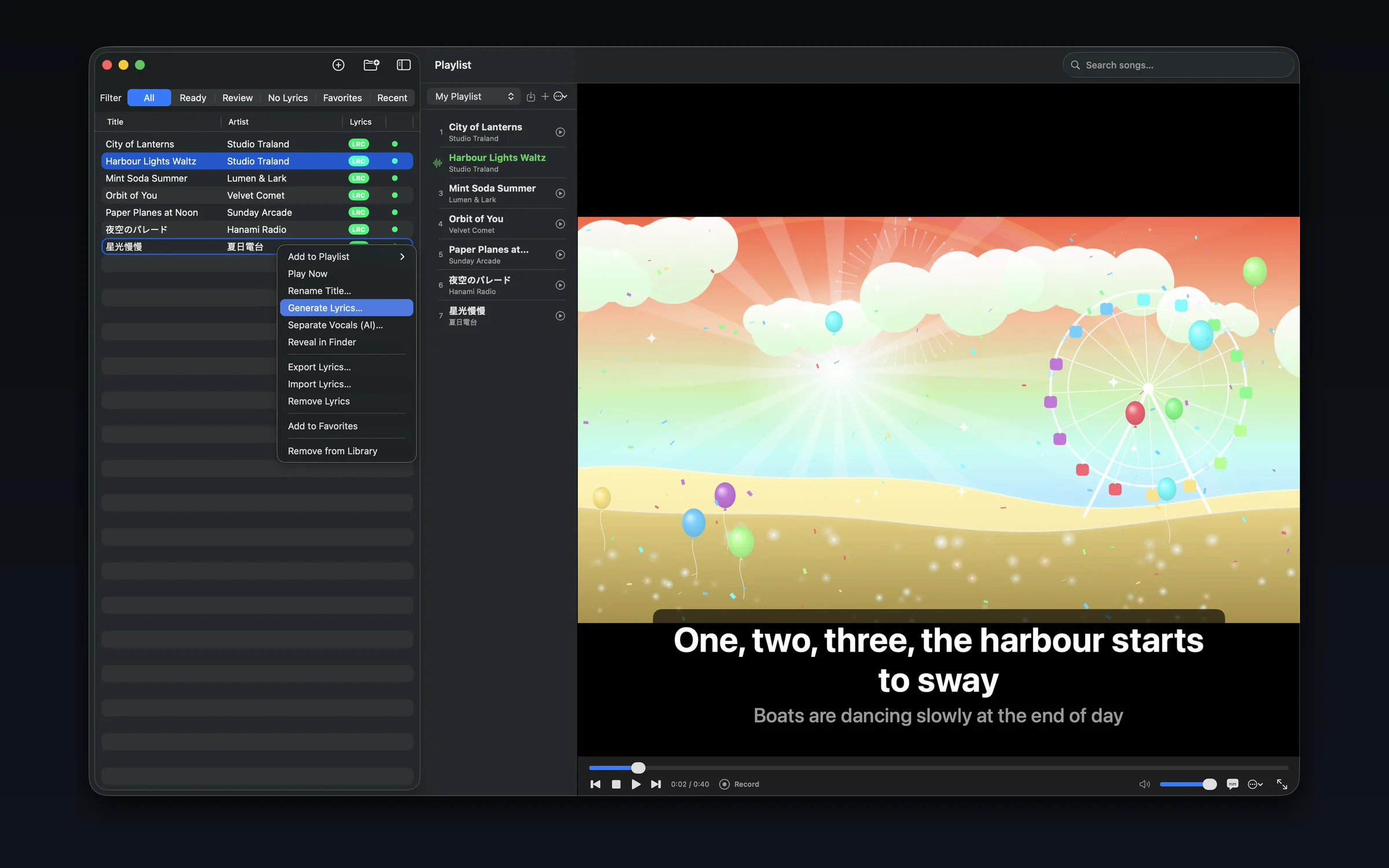
Import single files, whole folders, or ZIPs and Karaoke builds a searchable library — with a
LRC badge and a status dot telling you at a glance which songs are ready, which need
a lyric review, and which have none yet.
Filter by Ready, Review, No Lyrics, Favorites or Recent, queue up a playlist on the side, and play — video and lyrics on the right, host controls at the bottom.
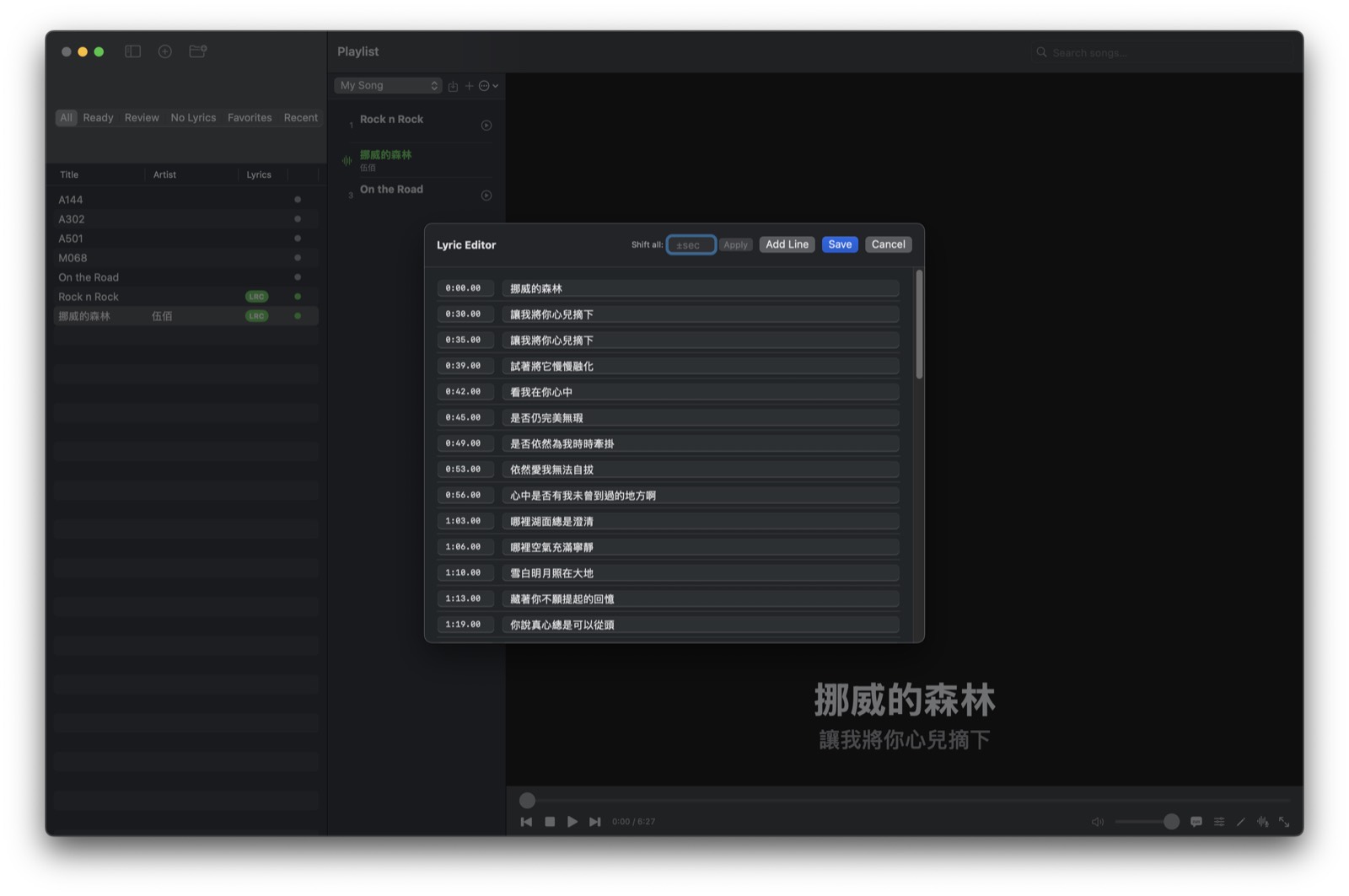
Fix drifting timing in seconds
Lyrics almost never match a video exactly. Nudge everything earlier or later with an offset, use tap-to-sync to set the first line as it plays, or drop multi-point anchors so the app interpolates the timing across a whole song that drifts.
The line-by-line editor lets you fix wording, shift all times at once, and add lines — then a big, TV-friendly display shows the current line and the next one for whoever's holding the mic.
The formats a karaoke library actually comes in
Karaoke tracks come from everywhere, in every wrapper. Karaoke opens them without you converting anything first.
Karaoke video
MP4, M4V, MOV, MPG and MPEG play directly, with the lyric overlay drawn on top by the app — not burned into the file.
Audio tracks
MP3, M4A, AAC, WAV, AIFF, CAF, FLAC and Opus, single files or whole folders at once.
MP3+G discs
Full CD+G support: pair a CDG with its MP3 and the original disc graphics play back exactly, the highlight sweeping each line.
ZIP archives
Most karaoke tracks are sold as a ZIP holding an MP3 and a CDG. Drop one in and Karaoke unpacks and pairs them — folders of ZIPs too.
LRC / SRT / text
Lyric files are auto-matched by name, with UTF-8, Big5, GBK, Shift-JIS and more decoded correctly, not mojibake.
Playlists
Create, reorder, rename and export playlists — then import them back on any Mac to run the same set again.
Runs on your Mac
Karaoke has no account and no sign-in, shows no ads, and ships no analytics or third-party tracking SDKs. Your library and the files you play stay on your Mac. It runs in the macOS App Sandbox and only touches the files you hand it.
Vocal separation and the recommended lyric engine both run on your Mac, and neither uploads anything. The AI features download their models the first time you use them — about 160 MB for separation and 630 MB for lyrics — and are offline from then on.
The one time audio leaves your Mac is if you pick the cloud OpenAI Whisper option for a song, which is off by default and needs your own API key. Apple Speech may also use Apple's servers for languages macOS has no on-device model for.